
You do not have sufficient permissions to access this page – wordpress error after migration or adding https
Hey guys, recently I’ve been dealing with an really weird and annoying bug/problem after changing a WordPress website to new domain name with https (ssl). Once I’ve installed everything I had the front-end blog running, but when I tried to login to wp-admin I got error saying “You do not have sufficient permissions to access this page.”

It was not my first time seeing this error, but at this moment I wanted to spend more time on it and find a solution. Really I’ve looked all over blog posts, stackoverflow, wordpress comunitly and nothing didnt worked.
So finally I went stright to the database and find the problem and the solution.
So here’s the solution:
Because of the database transfer I had to change the table_prefix variable from wp-config.php.
by default i had:
$table_prefix = 'wp_';
and I hade to change it to
$table_prefix = 'wpnew_';
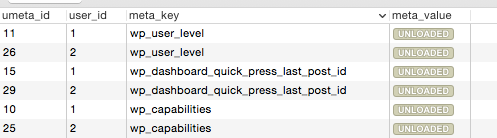
And that’s where the problem comes from, wordpress uses this perfix to insert few values in `wp_usermeta` which are using this perfix.
So here is how my wp_usermeta looked like and I didn’t manage to login to wp-admin, beacuse was using the old table_perfix (wp_):
And changing wp_ in the meta_key’s column did the magic.
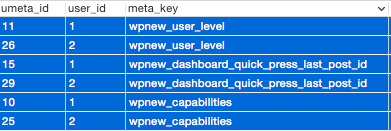
And wow. This worked!
So the most easy way to change tables names for wordpress site is :
1. Export your database dump
2. Find “wp_” and replace with “wp_new”
3. Upload and set the new perfix in wp-config.php
I hope this article will work for you guys.
Leave a Reply